Introduction
If you’re comparing ConvertKit vs ClickFunnels to find the right platform for your email marketing and sales funnels, you’re not alone. Both tools offer unique features tailored for different needs, with ConvertKit focusing on email automation for creators, and ClickFunnels excelling at building sales funnels for businesses. In this blog post, we’ll dive into the strengths and differences between ConvertKit and ClickFunnels to help you choose the best platform for your online marketing strategy.
Table of Contents
Pricing and Value for Money
When it comes to email marketing platforms, ConvertKit offers pricing plans that cater specifically to the needs of creators, bloggers, and small businesses. While not the cheapest option on the market, ConvertKit’s pricing structure provides excellent value, especially when you consider its features and ease of use.
Free Plan
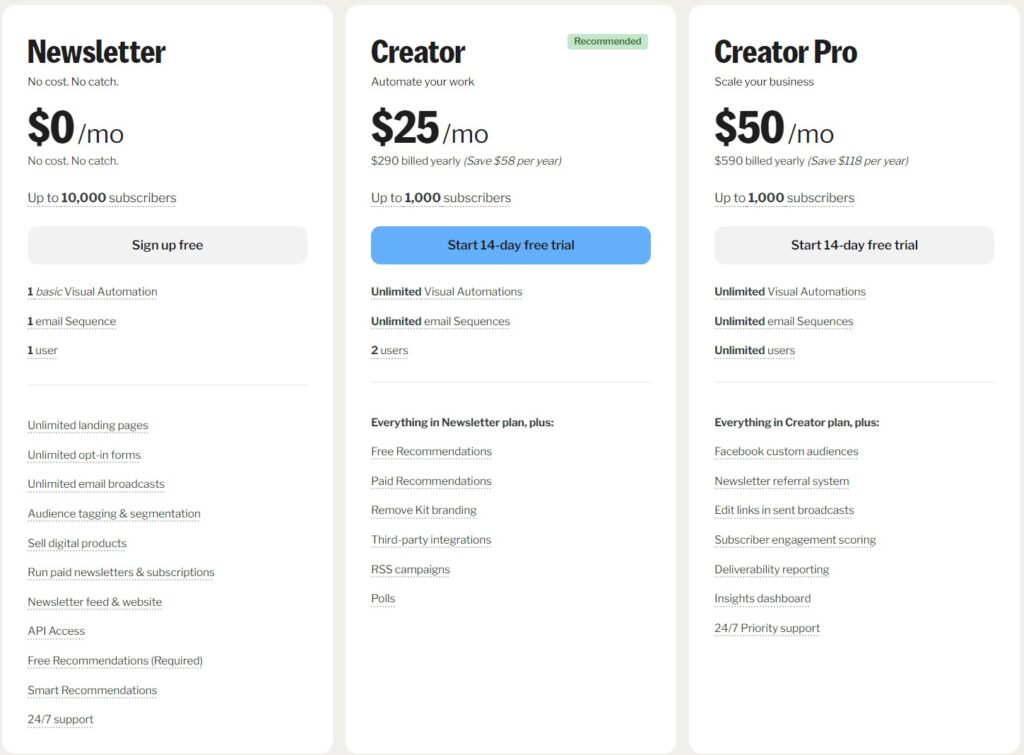
ConvertKit offers a free plan, which is ideal for beginners. This plan allows you to manage up to 1,000 subscribers, send unlimited emails, and create unlimited landing pages and forms. It’s a great entry point for creators who are just starting out. However, advanced features like automated email sequences and detailed analytics are not available in this tier, so those who need more functionality may want to upgrade.
Creator Plan
The Creator plan starts at $9 per month and unlocks key features like automated email funnels, sequences, and integrations with tools such as Shopify, Teachable, and more. This plan is perfect for creators looking to scale their email marketing efforts. As your subscriber count grows, the cost increases based on the number of contacts, but it remains competitively priced given the features it offers.
Creator Pro Plan
For creators who need more advanced capabilities, the Creator Pro plan starts at $25 per month. In addition to all the features in the Creator plan, Pro users get access to advanced tools like Facebook Custom Audiences, a newsletter referral system, and detailed subscriber analytics. These extra features make the Creator Pro plan a great choice for creators who want more control over their marketing and deeper insights into their audience.
Is ConvertKit Worth the Investment?
In terms of value for money, ConvertKit offers a solid balance between pricing and features. The platform’s specialized focus on creators, coupled with its scalability and automation tools, makes it a strong investment for those serious about growing their email list and improving engagement. While the cost may be higher than some other email marketing tools, the ROI can be significant, particularly for creators looking to streamline their marketing efforts.
Ease of Use
One of the biggest advantages of ConvertKit is its simplicity. The platform is designed with creators in mind, ensuring that both beginners and experienced users can navigate its features without feeling overwhelmed. In this section, we’ll break down how easy it is to get started and use the various features.
Simple Onboarding Process
ConvertKit has a streamlined onboarding process that helps users get up and running quickly. Whether you’re migrating from another platform or starting from scratch, ConvertKit offers step-by-step guidance and tutorials to make the transition smooth. Its clean dashboard layout helps users find essential tools like landing pages, forms, and email campaigns without any confusion.
Intuitive Email Builder
Unlike some email marketing platforms that rely on complicated drag-and-drop builders, ConvertKit uses a more minimalistic, text-based email editor. While this may seem basic compared to other tools, it’s actually a strength. For creators who prioritize content over design, this simplicity makes it easy to send professional emails without getting bogged down by formatting issues. The editor allows you to focus on writing, making it quick and hassle-free.
Automation Made Easy
One of ConvertKit’s standout features is its powerful automation, and it’s surprisingly easy to use. The visual automation builder lets you create automated workflows, such as welcome sequences or sales funnels, with a few clicks. You can set triggers, add conditions, and map out entire customer journeys without needing technical expertise. This ease of use ensures that even users with no prior experience in automation can set up effective email funnels.
Managing Subscribers
Managing your email list is another area where ConvertKit excels in terms of usability. The platform allows you to tag and segment subscribers based on their behavior or interests, making it simple to target specific audiences. The tagging system is straightforward and helps you keep track of your audience’s preferences without overwhelming you with complex options.
Is ConvertKit Easy to Use?

In summary, ConvertKit is one of the most user-friendly email marketing platforms available, especially for creators who want to focus on building relationships with their audience rather than spending hours on technical setups. Its clean interface, simple email builder, and intuitive automation tools make it a great choice for anyone looking to start or improve their email marketing efforts without a steep learning curve.
Email Automation Features
One of the key strengths of ConvertKit is its powerful and user-friendly email automation features. Designed specifically for creators and small businesses, ConvertKit’s automation tools allow users to engage with their audience at the right time, with minimal effort. In this section, we’ll explore the core automation features that make ConvertKit stand out.
Visual Automation Builder
ConvertKit makes automation simple with its visual automation builder. This tool allows users to create automated email workflows with a drag-and-drop interface, where you can visually map out your sequences. Whether you’re setting up a welcome sequence, a product launch funnel, or nurturing leads over time, the builder makes it easy to see the entire process in one view. You can set triggers based on subscriber actions, such as signing up for a form or clicking a specific link, making it easier to deliver targeted messages.
Customizable Triggers and Conditions
With ConvertKit, users can set up highly personalized email sequences using triggers and conditions. Triggers are events like a subscriber joining a list or making a purchase, while conditions allow you to segment and send different emails based on behavior or preferences. For example, you can set a trigger when someone downloads a free resource and automatically send a follow-up email offering a related product. This level of customization ensures your emails are always relevant, helping increase engagement and conversions.
Pre-Built Automations
To make things even easier, ConvertKit offers a library of pre-built automation templates that users can quickly customize to suit their needs. These templates cover common scenarios like onboarding new subscribers, promoting products, or re-engaging inactive subscribers. This feature is especially useful for beginners who may not be familiar with setting up automations from scratch but want to quickly create effective workflows.
Automation Rules and Actions
ConvertKit allows users to set up simple “if this, then that” rules to automate specific actions. For example, if a subscriber purchases a product, you can automatically tag them as a customer and move them to a different email sequence. These rules help ensure that your subscribers are always receiving the right content at the right time, without requiring manual updates or intervention.
Seamless Integration with Other Tools
ConvertKit’s automation features are further enhanced by its ability to seamlessly integrate with third-party tools and platforms. Whether you’re using e-commerce solutions like Shopify, course platforms like Teachable, or CRM tools, ConvertKit’s integrations help automate complex processes. You can automatically sync data between platforms, ensuring that your email sequences reflect real-time customer actions and preferences.

Why Choose ConvertKit for Email Automation?
Overall, ConvertKit simplifies email automation without sacrificing power or flexibility. Its visual builder, customizable triggers, and pre-built templates make it accessible to beginners, while its advanced rules and integrations allow for deeper personalization. Whether you’re a creator looking to nurture your audience or a business aiming to increase conversions, ConvertKit’s automation features help streamline your email marketing strategy for maximum impact.
Segmentation and Tagging
A critical feature of any email marketing tool is the ability to segment your audience effectively. ConvertKit excels in this area with its simple yet powerful tagging and segmentation features. These tools allow users to organize their email lists based on subscriber actions, preferences, and behaviors, making it easier to send personalized and relevant content. Let’s explore how segmentation and tagging work in ConvertKit.
Tagging System
ConvertKit uses a tagging system to help users keep track of their subscribers in a more personalized way. Tags can be applied to subscribers based on their actions, such as clicking a link, signing up for a particular form, or purchasing a product. This allows you to track where each subscriber is in their journey and create more targeted email campaigns. For example, you could tag subscribers who downloaded a free e-book and then follow up with relevant offers based on that action.
Subscriber Segments
In addition to tagging, ConvertKit allows you to create dynamic segments of your audience. Segments are groups of subscribers that meet specific criteria, such as being tagged as “purchased product” or “new subscriber.” Segments update automatically as subscribers take different actions, which means you don’t have to manually update your lists. This real-time segmentation helps ensure that your subscribers are always getting the right content at the right time.
Personalization for Higher Engagement
One of the major advantages of ConvertKit‘s segmentation and tagging system is the ability to deliver highly personalized content. By creating segments based on subscriber behavior and interests, you can craft emails that speak directly to their needs. Personalized content tends to have higher open rates and engagement, which leads to better conversions and more loyal subscribers.
Ease of Use in Managing Lists
Managing your subscribers through tagging and segmentation in ConvertKit is straightforward and user-friendly. The platform’s interface makes it easy to apply tags, create segments, and automate actions based on subscriber behavior. This ease of use helps even those without technical expertise to leverage advanced list management features, which can be a game-changer for small businesses and creators.
Why ConvertKit’s Segmentation and Tagging Stand Out
Overall, ConvertKit provides a flexible and powerful system for organizing and managing your email list. Its tagging and segmentation features are designed with creators in mind, offering a simple yet effective way to deliver personalized content. Whether you’re segmenting your audience based on purchases, engagement, or preferences, ConvertKit makes it easy to target the right people with the right message, ensuring that your marketing efforts are as effective as possible.

Deliverability Rates
When choosing an email marketing platform, deliverability rates are one of the most important factors to consider. Deliverability determines whether your emails actually reach your subscribers’ inboxes, rather than ending up in spam folders. ConvertKit is known for its strong focus on ensuring high deliverability, making it a top choice for creators and businesses alike. Let’s explore how ConvertKit’s deliverability rates stack up and why they are important.
What Are Deliverability Rates?
Deliverability rates refer to the percentage of emails that successfully land in your subscribers’ inboxes. A high deliverability rate means that more of your emails are being seen by your audience, which leads to better engagement and higher conversions. Factors that affect deliverability include email authentication, sender reputation, and the content of your emails.
How ConvertKit Ensures High Deliverability
ConvertKit takes several steps to ensure that your emails reach your subscribers’ inboxes:
- Authentication and Security: ConvertKit uses email authentication methods like DKIM (DomainKeys Identified Mail) and SPF (Sender Policy Framework) to verify that your emails are coming from a trusted source. This reduces the chances of your emails being marked as spam.
- Reputation Management: ConvertKit works hard to maintain a positive sender reputation. They monitor their platform to ensure that users are sending compliant and high-quality emails, which helps keep the overall reputation of ConvertKit’s IP addresses strong.
- Content Monitoring: ConvertKit also encourages users to create clean, relevant content that avoids common spam triggers. Their platform provides guidelines on how to structure your emails to avoid being flagged by spam filters, improving your deliverability rate.
Deliverability Performance Compared to Competitors
In the world of email marketing, ConvertKit is often praised for its excellent deliverability rates, which typically range between 95-98%. These rates are competitive with industry leaders like Mailchimp and ActiveCampaign. The combination of strong authentication protocols, proactive reputation management, and content guidelines helps ensure that your emails consistently reach their intended recipients.
Why High Deliverability Matters
A high deliverability rate is crucial for the success of your email marketing campaigns. If your emails are frequently landing in spam folders, it can significantly reduce engagement and conversions. With ConvertKit‘s high deliverability rates, you can trust that your emails are reaching your audience and giving you the best chance to build relationships and grow your business.
Is ConvertKit a Good Choice for Deliverability?
Overall, ConvertKit offers one of the best deliverability rates in the email marketing space. The platform’s focus on security, reputation management, and user education makes it an excellent choice for creators who want to ensure that their emails are seen by their audience. Whether you’re a blogger, online educator, or small business, ConvertKit’s high deliverability rates help you maximize the effectiveness of your email campaigns.
Visual Email Builders
When it comes to email marketing platforms, having a flexible and easy-to-use email builder is essential for creating professional-looking emails. While some platforms emphasize drag-and-drop visual editors, ConvertKit takes a different approach with its simplified, text-based email builder. This minimalistic style is specifically designed for creators who prioritize content over complex designs. Let’s explore how ConvertKit’s email builder compares to other visual email builders and why it works well for certain users.
ConvertKit’s Minimalist Email Builder
ConvertKit focuses on delivering a clean, content-first email builder. Instead of a drag-and-drop interface like Mailchimp or Constant Contact, ConvertKit offers a text-based editor that emphasizes simplicity. This allows creators to focus on writing great content without getting distracted by too many design options. You can still add essential elements like images, buttons, and links, but the overall style remains streamlined.
Why a Minimalist Approach Works
While ConvertKit’s email builder may seem basic compared to other platforms with complex visual editors, this simplicity can be an advantage. The minimalist approach ensures that emails are quick to create and easy to read on any device, especially mobile. Studies show that plain text or simple HTML emails often perform better in terms of deliverability and engagement, making ConvertKit’s builder ideal for creators who want to maximize their email open rates and clicks.
Customization Options
Although ConvertKit doesn’t offer a fully drag-and-drop interface, it still provides flexibility for customization. Users can add custom branding elements like logos, images, and call-to-action buttons. Additionally, ConvertKit allows you to use HTML for more advanced customizations if needed. The editor also supports personalization, allowing you to add subscriber-specific content dynamically, such as names or personalized product recommendations, which increases engagement.
Comparison with Drag-and-Drop Builders
Platforms like Mailchimp or ActiveCampaign offer more feature-rich drag-and-drop builders, which are ideal for businesses looking to create visually complex, branded emails. These platforms may appeal more to users who need detailed templates and extensive customization options. However, for creators focused on writing and delivering content, ConvertKit’s builder keeps things simple and less cluttered, reducing the time spent on design while still ensuring emails look professional.
Mobile Responsiveness
One of the standout features of ConvertKit’s minimalist email builder is that it automatically creates mobile-responsive emails. Given that a large percentage of subscribers open emails on mobile devices, this is a crucial factor. Without needing any extra effort, ConvertKit ensures that your emails look great and function well across all devices, whether they’re opened on a phone, tablet, or desktop.
Is ConvertKit’s Email Builder Right for You?
If you’re a content creator, blogger, or entrepreneur who values simplicity and speed over intricate email designs, ConvertKit’s minimalist email builder is an excellent choice. It allows you to focus on creating engaging content, with enough customization options to ensure your emails still reflect your brand. For creators who don’t need a drag-and-drop editor, ConvertKit strikes the right balance between ease of use and functionality, making it an ideal tool for content-focused email marketing.
Landing Pages and Forms
ConvertKit goes beyond just email marketing by offering built-in tools for creating landing pages and forms. These features are essential for growing your email list, capturing leads, and building a connection with your audience. Whether you’re promoting a product, offering a free download, or encouraging people to sign up for your newsletter, ConvertKit provides simple but effective tools to create forms and landing pages without the need for external software.
Easy-to-Use Landing Page Builder
ConvertKit offers an intuitive landing page builder that allows users to create visually appealing, high-converting pages in just a few steps. The platform provides several templates designed specifically for creators, including templates for webinars, product launches, and content upgrades. These templates are fully customizable, allowing you to add your own branding, text, images, and videos. The simple interface makes it easy to build a landing page that aligns with your brand, even if you don’t have design experience.

Form Creation and Customization
In addition to landing pages, ConvertKit allows you to create customizable forms to capture subscriber information. These forms can be embedded on your website, used as pop-ups, or even added to landing pages. You can choose from different form types, including inline, modal, slide-in, and more, to match the style and functionality you need. Like the landing page builder, the form builder is user-friendly, allowing you to quickly customize the look and feel to match your brand.
Integrations with Email Automation
A major advantage of using ConvertKit for landing pages and forms is the seamless integration with its email automation features. When someone submits a form or signs up via a landing page, they can automatically be added to a specific email sequence, tagged for future campaigns, or assigned to a particular segment of your audience. This integration allows you to set up targeted, automated workflows that nurture leads from the moment they join your list, ensuring you stay connected with your subscribers.
Analytics and Performance Tracking
ConvertKit makes it easy to track the performance of your landing pages and forms. The platform provides built-in analytics to show how well your forms and pages are converting, so you can quickly see how many subscribers each form has captured. This data helps you understand which pages and forms are performing best and allows you to optimize them for better results. Tracking key metrics like conversion rates ensures you’re continually improving your lead generation efforts.
Why Choose ConvertKit for Landing Pages and Forms?
Overall, ConvertKit’s landing page and form builders are designed with creators in mind, offering a simple yet effective way to grow your email list and engage your audience. The ease of use, combined with the powerful integration into ConvertKit’s email automation system, makes it a valuable tool for anyone looking to capture leads and nurture them with personalized email campaigns. Whether you need a simple form for your website or a full-featured landing page for a product launch, ConvertKit provides everything you need to create high-converting lead capture pages.
Integrations and API
A key feature of any email marketing platform is how well it integrates with other tools and services you use in your business. ConvertKit offers a robust set of integrations and a powerful API, making it easy for users to connect with various third-party platforms, automate workflows, and manage subscriber data. In this section, we’ll explore how ConvertKit’s integrations and API can benefit your email marketing efforts.

Seamless Integrations with Popular Tools
ConvertKit integrates seamlessly with a wide range of popular tools, which is crucial for creators and businesses that rely on multiple platforms. Whether you’re running an e-commerce store, selling courses, or managing content, ConvertKit has integrations that allow you to connect your email marketing to other parts of your business.
Some of the key integrations include:
- E-commerce platforms like Shopify and WooCommerce, allowing you to track customer purchases and trigger automated email sequences based on buying behavior.
- Membership and course platforms like Teachable and Thinkific, helping you manage student engagement, course launches, and upsell opportunities through targeted email campaigns.
- CRM and payment systems such as Stripe and Zapier, enabling seamless data transfer and automation between your email marketing and customer relationship management tools.
These integrations allow you to automate your marketing efforts, save time, and provide a better customer experience by syncing data across platforms.
Automation Through Zapier
One of the standout features of ConvertKit is its integration with Zapier, a tool that connects ConvertKit to thousands of other apps. This allows you to automate tasks between ConvertKit and apps that may not have direct integrations. For example, you can automatically add new webinar attendees from Zoom to your ConvertKit email list or send data from a Google Form submission straight to ConvertKit. Zapier opens up endless possibilities for automating your workflows without needing to write any code.
Custom Integrations via API
For users who need more advanced customizations, ConvertKit provides a powerful API. The API allows developers to build custom integrations that connect ConvertKit with proprietary systems or tools that don’t have built-in integrations. With the API, you can automate actions such as subscribing users, tagging contacts, or triggering email sequences based on custom events in your own platform. This flexibility makes ConvertKit a great choice for businesses with unique workflows or highly customized needs.
Ease of Use for Non-Developers
While ConvertKit’s API is a valuable resource for developers, the platform also makes it easy for non-developers to benefit from integrations. Most integrations, including Zapier, require no coding knowledge and can be set up in a few clicks. This accessibility ensures that even users without technical expertise can take advantage of ConvertKit’s integration capabilities to automate tasks and improve efficiency.
Why ConvertKit’s Integrations and API Matter
Having access to a wide range of integrations and a robust API makes ConvertKit a versatile tool for businesses of all sizes. By connecting ConvertKit to other platforms you use, you can create a seamless marketing ecosystem that saves time and improves the customer experience. Whether you’re using out-of-the-box integrations or building custom connections with the API, ConvertKit ensures that your email marketing works in harmony with the rest of your business tools.
Customer Support and Resources
When choosing an email marketing platform, access to reliable customer support and comprehensive resources is critical for ensuring a smooth experience. ConvertKit excels in providing strong customer support, along with a variety of educational resources that help users at all levels get the most out of the platform. In this section, we’ll explore the different support options and resources available to ConvertKit users.
Live Chat and Email Support
ConvertKit offers responsive customer support through live chat and email. The live chat feature is especially useful for users who need immediate assistance with technical issues or have questions about specific features. Their support team is known for being friendly, knowledgeable, and quick to respond. For less urgent inquiries, email support is also available, and users typically receive a response within a few hours.
Extensive Knowledge Base
For users who prefer to solve issues on their own, ConvertKit provides an extensive knowledge base. The knowledge base includes detailed articles, guides, and video tutorials that cover everything from getting started to advanced features like automation and integrations. It’s a great resource for both beginners and experienced users who want to deepen their understanding of the platform. The step-by-step instructions make it easy to follow along and implement new strategies within your email marketing efforts.
Webinars and Training
ConvertKit also offers regular webinars and training sessions, which are particularly helpful for users who want to stay up-to-date on best practices and new features. These webinars cover a wide range of topics, from growing your email list to building complex automation funnels. They are designed to provide actionable insights and practical tips that users can immediately apply to their campaigns. Whether you’re just getting started or looking to optimize your email marketing strategy, ConvertKit’s training sessions are an invaluable resource.
Creator Community and Forums
One of the unique features of ConvertKit is its focus on building a community of creators. ConvertKit has an active online community where users can connect, ask questions, share experiences, and learn from each other. This peer support network is a great way to get real-world advice and inspiration from other users who may have faced similar challenges. The platform also has dedicated forums where users can post questions and receive answers from both the community and ConvertKit staff.
Personalized Onboarding for New Users
To help new users get up and running quickly, ConvertKit offers personalized onboarding services. This is especially helpful for those who are new to email marketing or migrating from another platform. ConvertKit’s team guides users through the setup process, offering tips on how to organize subscribers, set up automations, and integrate the platform with other tools. This hands-on approach ensures that new users feel confident and supported as they start using ConvertKit.
Why ConvertKit’s Customer Support and Resources Matter
Overall, ConvertKit provides a comprehensive support system that caters to users of all experience levels. Whether you prefer live support, self-help resources, or community interaction, ConvertKit ensures you have the tools and guidance to succeed. The combination of responsive customer service, detailed documentation, and a thriving community makes ConvertKit an excellent choice for creators who want both flexibility and reliable support.
Affiliate Program
For users interested in generating income through referrals, ConvertKit offers a highly rewarding affiliate program. This program is an excellent opportunity for creators, bloggers, and marketers to earn recurring commissions by promoting ConvertKit’s email marketing platform. Let’s explore the key features of ConvertKit’s affiliate program, how it works, and why it’s a valuable option for affiliates.
High Recurring Commissions
One of the standout features of ConvertKit’s affiliate program is its generous commission structure. Affiliates earn a 30% recurring commission on every referral they make. This means that as long as the referred customer remains a ConvertKit subscriber, you’ll continue to earn commissions month after month. Given that many users stick with ConvertKit due to its creator-focused features, this recurring model can lead to a stable and long-term income stream.
How to Join the ConvertKit Affiliate Program
Joining the ConvertKit affiliate program is simple and free. You don’t need to be an existing ConvertKit customer to become an affiliate. Here’s how the process works:
- Sign up for the affiliate program through ConvertKit’s dedicated affiliate portal.
- Once approved, you’ll receive a unique referral link that you can share with your audience through blog posts, social media, emails, or other platforms.
- Each time someone clicks your link and signs up for ConvertKit, you’ll earn a commission on their subscription.
ConvertKit also provides affiliates with a range of promotional materials, including banners, email templates, and copy suggestions, to help you promote the platform effectively.
Long Cookie Duration
Another advantage of ConvertKit’s affiliate program is the 30-day cookie duration. This means that if someone clicks your referral link but doesn’t sign up right away, you’ll still receive credit for the referral if they sign up within 30 days. This extended window increases the chances of earning commissions, especially if potential customers need more time to explore the platform before committing.
Reliable Payouts
ConvertKit ensures that affiliates are paid reliably. Payouts are processed monthly through PayPal, making it easy to receive your commissions. Additionally, there’s no cap on how much you can earn, allowing top affiliates to make significant income over time as they grow their referrals.
Why ConvertKit’s Affiliate Program is Ideal for Creators
ConvertKit’s affiliate program is particularly well-suited for creators, bloggers, and digital entrepreneurs who are already using email marketing as part of their business strategy. By promoting a tool that they may already use and love, affiliates can share genuine recommendations with their audience, which can lead to higher conversion rates. Additionally, ConvertKit’s focus on creators means that your audience is likely to benefit from the platform’s features, making it easier to promote authentically.
Support and Resources for Affiliates
ConvertKit provides comprehensive support for its affiliates. Affiliates have access to a dedicated dashboard where they can track their performance, manage their referrals, and view their earnings. ConvertKit also offers helpful resources, including tutorials and tips on how to promote the platform effectively. This support helps affiliates optimize their marketing efforts and maximize their earnings potential.
Is ConvertKit’s Affiliate Program Right for You?
If you’re a creator, blogger, or marketer looking to monetize your content, ConvertKit’s affiliate program offers a lucrative opportunity. With high recurring commissions, a generous cookie duration, and ample support, ConvertKit provides all the tools you need to succeed as an affiliate. Whether you’re already using ConvertKit or simply believe in its value for creators, this program is a great way to generate ongoing income by recommending a platform that helps others grow their businesses.
Analytics and Reporting
Effective email marketing isn’t just about sending emails—it’s also about understanding how your campaigns perform. ConvertKit offers robust analytics and reporting features to help creators and businesses track the success of their email marketing efforts. By providing detailed insights into key metrics, ConvertKit enables users to optimize their strategies and improve engagement. In this section, we’ll explore how ConvertKit’s analytics and reporting tools work and why they are essential for email marketing success.
Tracking Key Metrics
ConvertKit makes it easy to track all the essential email marketing metrics from a single dashboard. Some of the key metrics you can monitor include:
- Open rates: See how many of your subscribers are opening your emails, which helps gauge how engaging your subject lines are.
- Click-through rates (CTR): Track the percentage of subscribers clicking on links within your emails, helping you understand how effective your content and calls-to-action are.
- Unsubscribes: Monitor the number of people opting out of your list after receiving an email, which can indicate if certain campaigns are not resonating with your audience.
- Conversions: For e-commerce or sales-focused campaigns, you can track how many subscribers completed a desired action, such as purchasing a product or signing up for a webinar.
These metrics give you a clear view of your campaign’s overall performance and provide actionable insights for improvement.
Visual Reporting
ConvertKit provides easy-to-understand visual reports that break down your email marketing performance. The data is presented in simple graphs and charts, making it quick to assess how each email campaign is performing at a glance. This visual approach helps users without deep technical knowledge to interpret their analytics and make informed decisions about how to adjust their campaigns for better results.
Subscriber Engagement Tracking
A standout feature of ConvertKit’s reporting is its focus on subscriber engagement. The platform allows you to see how individual subscribers are interacting with your emails. For instance, you can view which emails a subscriber has opened, what links they clicked on, and what forms or landing pages they interacted with. This granular level of detail is invaluable for segmenting your audience based on engagement and targeting your most active subscribers with more tailored content.
Automation Performance Insights
If you’re using ConvertKit’s powerful automation features, you can track how your automated workflows are performing. ConvertKit’s reporting includes data on the effectiveness of email sequences, such as how many people completed a specific automation and where drop-offs occurred. By identifying these points, you can optimize your workflows to ensure that more subscribers reach the end of your funnel.
A/B Testing
Although ConvertKit’s A/B testing capabilities are more basic compared to some other platforms, users can still test subject lines to improve open rates. By running A/B tests, you can experiment with different subject lines to see which ones resonate best with your audience, helping you optimize future campaigns. This feature, combined with the overall reporting tools, allows you to constantly refine your email marketing strategy.
Why ConvertKit’s Analytics and Reporting Are Essential
The analytics and reporting features in ConvertKit are essential for anyone serious about email marketing. By providing detailed insights into key metrics like open rates, click-through rates, and conversions, ConvertKit empowers users to understand what’s working and what isn’t. This data-driven approach allows you to continually improve your campaigns, better engage your audience, and ultimately achieve higher conversion rates. Whether you’re a creator looking to grow your list or a business focused on sales, ConvertKit’s analytics ensure you’re always optimizing for success.
Email Templates and Design Options
When it comes to email marketing, having access to flexible templates and design options can save time and help create visually appealing emails. ConvertKit takes a streamlined approach to email design, focusing on simplicity and functionality over highly elaborate templates. In this section, we’ll explore ConvertKit’s email templates, design options, and how they benefit content creators and marketers.
Minimalist Email Templates
Unlike many other email marketing platforms that offer a wide range of pre-designed, drag-and-drop templates, ConvertKit opts for a more minimalist set of email templates. The platform provides a handful of clean, simple templates that focus on delivering your message without unnecessary distractions. These templates are ideal for creators who prioritize content over heavy design elements and want to ensure their emails are quick to load and easy to read.
Customization Options
Even with its minimalist approach, ConvertKit allows for a good level of customization within its templates. You can easily add your own branding elements, such as logos and custom colors, to match your brand identity. The text-based editor lets you modify fonts, headings, and structure, while still keeping the overall design simple. This makes it easy to create personalized and professional-looking emails without the complexity of drag-and-drop builders.
For users with more advanced design needs, ConvertKit also supports custom HTML. This gives you the freedom to design fully customized email templates if you prefer more control over the layout and visual elements. This option is particularly useful for designers or businesses with specific brand guidelines who want to maintain consistency across their marketing materials.
Mobile-Responsive Design
One of the strengths of ConvertKit’s email templates is that they are mobile-responsive by default. With the majority of users opening emails on their smartphones, it’s crucial to have designs that look good on any device. ConvertKit’s templates are optimized for mobile, ensuring that your emails will appear clean and easy to read, whether they are viewed on a desktop, tablet, or phone.
Focus on Simplicity
The simplicity of ConvertKit’s design options is a major advantage for creators who value speed and efficiency. Since the platform doesn’t overload users with too many design choices, it’s easy to create emails quickly without getting bogged down in layout decisions. This simplicity also enhances deliverability rates, as emails with fewer images and complex elements tend to load faster and avoid spam filters, ensuring more of your messages reach the inbox.
Email Personalization
While ConvertKit’s templates may seem simple at first glance, they offer powerful personalization options. You can use merge tags to include personalized content for each subscriber, such as their name or specific actions they’ve taken. This ability to deliver personalized emails at scale is a key feature for creators who want to build stronger connections with their audience while maintaining a simple design aesthetic.
Why ConvertKit’s Email Templates and Design Options Work
For creators, bloggers, and marketers who prioritize content and ease of use, ConvertKit’s minimalist email templates and design options are highly effective. The platform’s focus on delivering simple, clean emails that load quickly and look great on any device ensures that your message always comes through. While other platforms may offer more elaborate design tools, ConvertKit’s approach is ideal for users who want to focus on writing engaging content without the need for complex design skills.
Free Plan and Trial Periods
When considering an email marketing platform, pricing and the availability of free plans or trial periods can play a big role in your decision. ConvertKit offers both a generous free plan and flexible trial options, making it easy for creators and small businesses to get started without a financial commitment. In this section, we’ll take a closer look at what ConvertKit’s free plan and trial periods offer.
ConvertKit’s Free Plan
ConvertKit provides a comprehensive free plan that is ideal for beginners or small creators who are just starting to build their email list. The free plan allows you to manage up to 1,000 subscribers, which is perfect for growing your audience before upgrading to a paid plan. With the free plan, users have access to key features such as:
- Unlimited emails: Send as many email broadcasts as you need, without restrictions on the number of emails.
- Unlimited landing pages and forms: Create landing pages and forms to capture leads and grow your email list.
- Subscriber tagging: Organize your subscribers with tags to ensure better segmentation and targeting.
- Email support: Access ConvertKit’s support team for help, even on the free plan.
While the free plan includes many of the basic tools you need to start email marketing, it does have some limitations. For example, advanced automation features, integrations with third-party apps, and automated email sequences are not available in the free version. As your needs grow, you may need to upgrade to a paid plan for access to these more advanced features.
Trial Period for Paid Plans
For users who are interested in exploring more advanced features, ConvertKit offers a free trial period for its paid plans. You can start with either the Creator or Creator Pro plan on a 14-day free trial, which gives you full access to all of the premium features without any upfront cost. This is a great opportunity to test ConvertKit’s advanced automation tools, integrations, and detailed analytics before committing to a subscription.
During the trial, you can:
- Build complex email automations using the visual automation builder.
- Integrate ConvertKit with popular platforms like Shopify, Teachable, and WordPress.
- Access detailed reporting to analyze open rates, click-through rates, and subscriber engagement.
- Try out features exclusive to the Creator Pro plan, like Facebook Custom Audiences and subscriber scoring.
The trial period is designed to help you experience the full power of ConvertKit before making a decision, ensuring that it’s the right tool for your email marketing needs.
Flexibility to Upgrade
One of the advantages of ConvertKit’s free plan and trial period is the flexibility to upgrade as your business grows. You can start with the free plan, and once you’re ready to scale, upgrading to a paid plan unlocks more advanced tools to help you manage larger audiences and automate your email marketing. The ability to seamlessly transition from the free plan to the Creator or Creator Pro plan means that ConvertKit can grow with you, making it a scalable solution for creators at all stages of their journey.
Is ConvertKit’s Free Plan Worth It?
For creators who are just getting started with email marketing, ConvertKit’s free plan offers excellent value. It provides all the essential tools needed to grow an email list and engage with subscribers, without any upfront costs. As you grow your audience and require more advanced features, ConvertKit’s trial period and flexible upgrade options make it easy to transition to a paid plan that fits your needs.
Target Audience (Creators vs. Businesses)
ConvertKit is designed with a specific focus on creators, but it also offers features that can cater to small businesses. Understanding the platform’s target audience will help you decide whether ConvertKit is the right fit for your email marketing needs. In this section, we’ll explore how ConvertKit serves both creators and businesses, and which audience benefits the most from its features.
ConvertKit for Creators
At its core, ConvertKit was built with creators in mind. Whether you’re a blogger, YouTuber, podcaster, or online educator, ConvertKit’s features are tailored to help you grow and engage your audience effectively. Here’s why ConvertKit is ideal for creators:
- Content-first approach: ConvertKit’s minimalist email design allows creators to focus on delivering valuable content without getting bogged down in heavy design elements. This is particularly appealing to creators who want to connect with their audience on a more personal level through text-based emails.
- Automation and segmentation: ConvertKit’s automation tools are designed to help creators nurture their audience over time. For example, creators can set up automated email sequences to welcome new subscribers, promote content, or sell digital products like e-books and courses. The segmentation features also help creators tailor messages to specific parts of their audience based on behavior and interests.
- Product launches and sales funnels: ConvertKit is perfect for creators who sell digital products. You can create landing pages, manage product launches, and set up sales funnels to guide your audience from lead to customer. The platform’s ease of use ensures that creators can manage these processes without requiring extensive technical skills.
For creators, ConvertKit offers a balance of simplicity and power, making it easy to build strong relationships with their audience while effectively monetizing their content.
ConvertKit for Businesses
While ConvertKit is creator-focused, it also has features that can benefit small businesses, particularly those looking to build strong customer relationships through email marketing. However, businesses with more complex needs or larger teams may find ConvertKit less suited for advanced operations compared to more business-centric platforms like ActiveCampaign or HubSpot. Here are a few reasons why ConvertKit can work for small businesses:
- Customer engagement: ConvertKit’s tools for segmentation and automation are useful for businesses that want to deliver personalized content to customers. Businesses can set up automated emails based on customer behavior, such as purchase history or engagement with marketing materials, which can help improve customer retention.
- Ease of use: Small businesses often need an email marketing tool that is quick to set up and easy to manage. ConvertKit’s intuitive interface and pre-built automation templates allow businesses to create campaigns without the need for technical expertise.
- Sales funnels: Similar to creators, businesses can take advantage of ConvertKit’s sales funnel features to nurture leads and move them through the buyer’s journey. Whether you’re promoting a new product, offering a service, or running a sale, ConvertKit provides simple tools to help manage the process.
However, for businesses that require advanced CRM features, more detailed reporting, or complex automation, ConvertKit might not offer all the tools needed. In these cases, it may be better suited for businesses with simpler marketing needs or those that rely heavily on content-driven engagement.
Key Differences: Creators vs. Businesses
While both creators and businesses can benefit from ConvertKit, there are key differences in how each group can use the platform:
- Focus on content: ConvertKit’s tools are more content-driven, making it a great fit for creators who want to share blog posts, podcasts, videos, or educational materials with their audience. Businesses that rely on this type of content marketing will also find it useful, but those focused on complex sales pipelines may need additional tools.
- Automation and engagement: Creators typically use automation to nurture subscribers, build relationships, and promote products over time. Businesses, on the other hand, might need more robust features for customer lifecycle management, which ConvertKit supports but not at the level of some other platforms.
Is ConvertKit Right for You?
If you’re a creator focused on building a strong connection with your audience and monetizing your content, ConvertKit is an ideal platform. Its ease of use, powerful automation, and content-first approach make it perfect for bloggers, YouTubers, educators, and digital entrepreneurs. Small businesses can also benefit from ConvertKit’s simplicity and ability to engage customers, but larger businesses with more complex marketing needs may need a more comprehensive platform.
Migration and Setup Process
Switching email marketing platforms can seem like a daunting task, but ConvertKit makes the migration and setup process straightforward and user-friendly. Whether you’re moving from another email marketing tool or starting from scratch, ConvertKit provides the resources and support you need to get up and running quickly. In this section, we’ll explore how easy it is to migrate your data to ConvertKit and set up your account for success.
Simple Setup for New Users
For new users, ConvertKit offers a simple and intuitive setup process. After signing up, you’ll be guided through the basics of creating your first email, setting up a landing page, and organizing your subscribers. ConvertKit’s user-friendly interface ensures that even those new to email marketing can quickly learn how to navigate the platform. The dashboard is clean and easy to use, allowing you to access essential features like automations, broadcasts, and forms with just a few clicks.
Migration Support from Other Platforms
If you’re switching from another email marketing platform, ConvertKit provides dedicated migration support to make the transition as smooth as possible. ConvertKit’s team will help you move over your subscribers, tags, email sequences, and any other important data from platforms like Mailchimp, AWeber, or ActiveCampaign. This hands-on assistance ensures that you don’t lose valuable data during the migration process.
For those migrating independently, ConvertKit offers step-by-step guides and resources to help you move your contacts, forms, and automation workflows into the platform without hassle. You can also export your subscribers and other data from your previous platform and import them into ConvertKit using simple CSV files.
Importing Subscribers and Lists
One of the first steps in the migration process is importing your subscribers. ConvertKit makes this easy by allowing you to upload a CSV file of your existing contacts. You can organize your subscribers into tags or segments right from the start, ensuring that your list is well-structured from the beginning. This segmentation is essential for targeting specific groups with personalized content and automating workflows based on subscriber behavior.
Setting Up Automations and Sequences
Once your subscribers are imported, you can begin setting up automations and sequences. ConvertKit’s visual automation builder makes it easy to recreate or design new automated workflows. Whether you’re building a welcome sequence, product launch funnel, or drip campaign, ConvertKit’s drag-and-drop automation builder helps you map out the entire process visually. For those migrating from platforms with complex automations, ConvertKit’s tools allow you to rebuild or refine your workflows efficiently.
Onboarding Support and Resources
ConvertKit offers extensive onboarding support to ensure a smooth start. New users have access to webinars, tutorials, and an extensive knowledge base that walks you through every feature of the platform. ConvertKit also provides personalized onboarding for those who want a more hands-on experience, helping you set up key features like email sequences, forms, and integrations right from the start.
Additionally, ConvertKit’s customer support team is available via live chat and email to help answer any questions or resolve issues during the migration and setup process. This level of support is invaluable, especially for users moving from another platform or setting up more complex automations.
Ease of Integration with Other Tools
During the setup process, you’ll also have the opportunity to integrate ConvertKit with the other tools you use. ConvertKit offers seamless integrations with popular platforms like Shopify, WordPress, Teachable, and more, making it easy to connect your email marketing efforts with your website, e-commerce store, or online courses. These integrations help streamline your marketing processes and ensure that data flows smoothly between ConvertKit and your other platforms.
Why ConvertKit’s Migration and Setup Process is Efficient
Whether you’re starting fresh or migrating from another platform, ConvertKit makes the setup process as painless as possible. Its simple, intuitive interface and dedicated support ensure that you can quickly get up and running with your email marketing. For creators and businesses alike, ConvertKit’s migration tools and onboarding resources provide a smooth transition, so you can focus on growing your audience and engaging with your subscribers.
Final Verdict: Is ConvertKit Right for You?
Choosing the right email marketing platform is crucial for the success of your campaigns, whether you’re a content creator, small business, or marketer. ConvertKit stands out for its simplicity, creator-focused features, and powerful automation tools. But is ConvertKit the right fit for your needs? Let’s take a final look at what makes ConvertKit a top choice and whether it’s the best option for you.
Ideal for Content Creators
ConvertKit is specifically designed with content creators in mind. If you’re a blogger, YouTuber, podcaster, or online educator, ConvertKit offers everything you need to grow and engage your audience. The platform focuses on content-first email marketing, allowing you to easily send emails that prioritize your message. With features like segmentation, tagging, and automation, you can nurture your audience and send personalized content at the right time, all without needing to be a tech expert.
Creators looking to monetize their audience will also appreciate ConvertKit’s landing pages, product sales funnels, and integration with platforms like Teachable and Shopify. These tools make it easy to promote and sell digital products, courses, or memberships, helping you turn subscribers into paying customers.
Excellent Automation and Simplicity
For those who value ease of use, ConvertKit excels in providing a user-friendly experience. Its intuitive interface ensures that even beginners can quickly set up email sequences, manage subscribers, and track performance. The visual automation builder makes it easy to create powerful workflows, whether you’re setting up a simple welcome sequence or a complex sales funnel.
If automation is a key part of your email marketing strategy, ConvertKit’s automation tools offer just the right balance of simplicity and flexibility. You can set up highly personalized journeys for your subscribers without needing to spend hours learning how to navigate a complex system.
Great for Small Businesses with Content-Driven Strategies
While ConvertKit is geared primarily toward creators, it can also be a good fit for small businesses, especially those with a strong focus on content marketing. If your business relies on building relationships through valuable content, ConvertKit’s features will help you create targeted, personalized emails that drive engagement. Its automation and segmentation tools make it easy to stay connected with customers and nurture leads over time.
However, businesses with more complex needs, such as advanced reporting, CRM capabilities, or large-scale marketing operations, may find that ConvertKit lacks some of the in-depth features offered by other business-centric platforms like ActiveCampaign or HubSpot.
Pricing and Value
ConvertKit offers a range of pricing plans, including a free plan for up to 1,000 subscribers, which is ideal for creators and small businesses just starting out. The paid plans unlock more advanced features, including automation, integrations, and reporting, making it a scalable solution that grows with your audience. While ConvertKit may be slightly more expensive than some other tools, its focus on delivering value through powerful automation and personalization justifies the cost for many users.
Is ConvertKit Right for You?
Ultimately, ConvertKit is a great choice if you’re a creator or small business looking for a simple, powerful email marketing tool that prioritizes content and audience engagement. It’s designed for users who want to focus on building relationships with their audience without getting bogged down by overly complex features. If your goal is to send personalized, well-timed emails that resonate with your subscribers and drive results, ConvertKit provides the perfect balance of simplicity and power.
If you’re a business with more complex marketing needs or require advanced analytics, you may want to explore other platforms. But for creators and small businesses focused on growth through content, ConvertKit is a highly effective and user-friendly solution.
Conclusion
In conclusion, ConvertKit is a versatile and user-friendly email marketing platform that caters primarily to content creators, but can also serve the needs of small businesses. With its focus on simplicity, automation, and personalized communication, ConvertKit enables users to grow their audience and nurture relationships effectively. The platform’s minimalist design options, robust automation features, and easy-to-use tools make it an ideal choice for creators who prioritize content and engagement over complex design and technical tasks.
Whether you’re just starting with email marketing or looking to take your campaigns to the next level, ConvertKit’s flexible pricing, including a generous free plan, ensures that it can grow with you. While businesses with more advanced needs may require additional features found in other platforms, ConvertKit remains a top contender for creators and entrepreneurs who want to streamline their marketing efforts and build lasting connections with their audience.
If you’re ready to dive into email marketing with a focus on content and personalization, ConvertKit is definitely worth considering for your next email marketing tool.
Related reading: