When comparing ActiveCampaign vs ClickFunnels in 2024, businesses are presented with two powerful platforms, each offering unique features to ensure email marketing success. Both tools excel in different areas of automation, campaign management, and lead generation, but which one is the best fit for your business? Let’s explore their strengths to help you make the right decision for your email marketing needs in the coming year.
Overview of ActiveCampaign and ClickFunnels
In this section, we’ll provide a general overview of ActiveCampaign vs ClickFunnels, two powerful platforms designed to help businesses grow through automation and sales funnel creation. While they share some commonalities, these tools serve different purposes and target different aspects of digital marketing.
What is ActiveCampaign?
ActiveCampaign is primarily an email marketing and marketing automation platform that focuses on helping businesses build and nurture customer relationships. It offers robust email marketing features, customer relationship management (CRM), and advanced automation workflows.
With ActiveCampaign, businesses can create highly personalized email campaigns, track customer interactions, and automate follow-ups to boost engagement. It’s widely regarded for its flexibility, particularly for small to medium-sized businesses looking for comprehensive email marketing and CRM tools.
Key Features of ActiveCampaign:
- Advanced email automation and segmentation
- Built-in CRM for managing customer relationships
- SMS marketing and marketing automation
- Integration with over 850 apps and services
- Customizable reports and analytics
ActiveCampaign is an excellent choice for businesses that want a deep focus on email marketing and customer engagement through automation, without needing complex sales funnels.
What is ClickFunnels?
ClickFunnels, on the other hand, is a specialized tool designed specifically for creating high-converting sales funnels. It allows businesses to build complete sales pipelines, including landing pages, opt-in forms, order pages, and more, all aimed at driving conversions.
ClickFunnels simplifies the process of creating and optimizing funnels, making it a top choice for entrepreneurs, marketers, and e-commerce businesses that rely heavily on sales funnels to convert traffic into sales.
Key Features of ClickFunnels:
- Drag-and-drop funnel builder for creating custom sales funnels
- Ready-to-use funnel templates for various industries
- A/B testing for funnel optimization
- Integration with email services and payment gateways
- Affiliate management through the built-in “Backpack” feature
ClickFunnels is ideal for businesses that need an all-in-one solution for funnel building and sales conversion. It excels at helping users build and test sales funnels without requiring advanced technical skills.

ActiveCampaign vs ClickFunnels: Which Is Better for Your Business?
While ActiveCampaign focuses on email marketing and customer relationship management, ClickFunnels is all about sales funnel creation and optimization. Depending on your business needs, you may find one platform better suited to your goals.
- ActiveCampaign is better for businesses focused on email marketing, automation, and customer relationship management.
- ClickFunnels is better for businesses that need a powerful tool for building and managing sales funnels to drive sales.
Pricing and Plans
When comparing ActiveCampaign vs ClickFunnels, pricing is a crucial factor for most businesses, especially those looking to maximize their marketing budgets. Both platforms offer different pricing models based on the features they provide, and understanding the differences can help you decide which one is the best fit for your needs.
ActiveCampaign Pricing
ActiveCampaign’s pricing is flexible and depends largely on the number of contacts in your email list and the plan you choose. They offer four main tiers:
- Lite Plan: Starts at $29/month (for 1,000 contacts). This plan includes email marketing, marketing automation, and basic reporting.
- Plus Plan: Starts at $49/month (for 1,000 contacts). Adds features like CRM, lead scoring, SMS marketing, and custom branding.
- Professional Plan: Starts at $149/month (for 1,000 contacts). This plan includes advanced reporting, split automation, and predictive sending.
- Enterprise Plan: Pricing is custom. It includes all features plus dedicated account support, custom reporting, and deeper integrations.
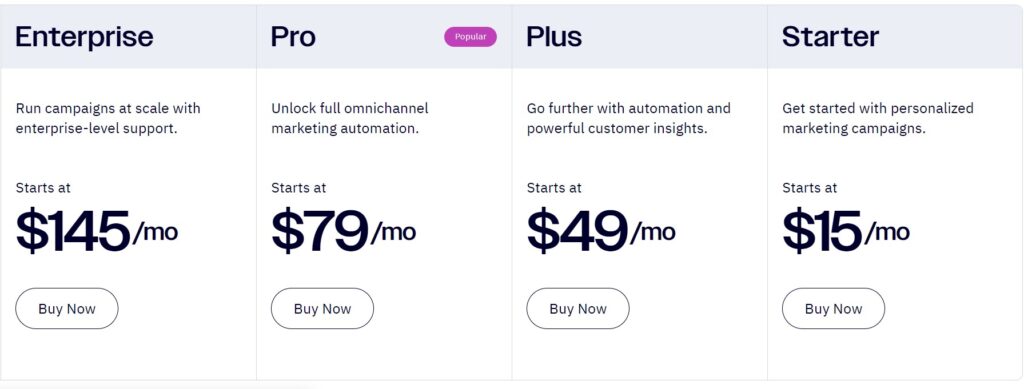
ActiveCampaign’s pricing scales based on the size of your contact list, so businesses with larger email lists may see their costs increase significantly.
ClickFunnels Pricing
ClickFunnels has a simpler pricing model with two main plans:
- Basic Plan: $97/month. This includes 20 funnels, 100 pages, 20,000 visitors, and 3 payment gateways. It’s designed for smaller businesses and entrepreneurs who need basic funnel creation tools.
- Platinum Plan: $297/month. This plan includes unlimited funnels, pages, and visitors, as well as priority support, advanced funnel features, and additional tools for scaling your business.
For advanced users, ClickFunnels also offers a Two Comma Club X Plan at $2,497/month for businesses generating over $1 million in sales. It includes all the features from the lower tiers plus exclusive coaching, access to VIP events, and more.
Pricing Comparison: Which One Is More Affordable?
In terms of pricing, ActiveCampaign is more cost-effective for businesses primarily focused on email marketing and automation. Its pricing tiers allow you to scale as your contact list grows, making it ideal for startups and small businesses.
On the other hand, ClickFunnels is more expensive, but it justifies the cost with its powerful sales funnel features. Businesses that rely heavily on sales funnels and need an all-in-one solution may find the pricing worthwhile.
In conclusion, the choice between ActiveCampaign vs ClickFunnels largely depends on your business needs. If your priority is email marketing automation, ActiveCampaign offers a more affordable solution. However, if you need robust sales funnel functionality, ClickFunnels, despite its higher price, may be the better investment.
Ease of Use
When comparing ActiveCampaign vs ClickFunnels, ease of use is a key factor for businesses, especially those with limited technical expertise. Let’s look at how user-friendly each platform is, from setup to daily operation, and which one offers a smoother experience for marketers and business owners.
ActiveCampaign: User-Friendly, But Learning Curve Exists
ActiveCampaign is known for its robust features, especially in marketing automation, but with this power comes a bit of a learning curve. While the interface is clean and well-organized, getting the most out of ActiveCampaign requires users to spend some time understanding its automation workflows, segmentation options, and advanced email marketing features.
For beginners, the platform may initially feel overwhelming due to the wide range of tools it offers, including CRM functionality and advanced reporting. However, once users get familiar with the interface, it becomes much easier to navigate.
ActiveCampaign provides an extensive library of tutorials, webinars, and a support team to help new users get comfortable with the platform. The drag-and-drop email builder is intuitive, making email creation straightforward, but setting up complex automation flows can take more time and practice.
Pros of ActiveCampaign’s Ease of Use:
- Clean and organized dashboard
- Helpful drag-and-drop email builder
- Extensive tutorials and support
- Customizable automation, though advanced
Cons of ActiveCampaign’s Ease of Use:
- Steeper learning curve for automation features
- Requires time to fully leverage its capabilities
ClickFunnels: Designed for Simplicity
ClickFunnels, by contrast, is designed with simplicity in mind. Its main selling point is how easy it makes creating sales funnels, even for users with little to no technical background. The platform’s drag-and-drop funnel builder allows you to create entire funnels — from landing pages to checkout processes — with minimal effort.
For users who aren’t tech-savvy, ClickFunnels offers ready-made funnel templates that are easy to customize. This makes it ideal for small businesses and entrepreneurs who need to get a sales funnel up and running quickly.
The platform is structured to guide users through the funnel-building process step by step, so even if you’ve never created a funnel before, you can do so with ease. ClickFunnels also includes a variety of visual tools and A/B testing options that help users optimize their funnels without diving into technical details.
Pros of ClickFunnels’ Ease of Use:
- Very beginner-friendly interface
- Drag-and-drop funnel builder for quick setups
- Pre-built funnel templates for various industries
- Step-by-step funnel creation process
Cons of ClickFunnels’ Ease of Use:
- Limited in terms of detailed customization options compared to more technical platforms
- The simplicity may not appeal to users who need more advanced tools for complex marketing
Ease of Use Comparison: ActiveCampaign vs ClickFunnels
In the battle of ActiveCampaign vs ClickFunnels, ClickFunnels takes the lead for ease of use, particularly for beginners or non-technical users. Its focus on simplifying the sales funnel creation process makes it an excellent choice for those who need to get results quickly without a steep learning curve.
On the other hand, ActiveCampaign is more suitable for users who are willing to invest time in learning its powerful features, particularly those related to email automation and customer management. While it may take longer to master, the customization potential is much higher once you’re comfortable with the platform.
Email Marketing Features
When comparing ActiveCampaign vs ClickFunnels, email marketing features are a major differentiating factor. Both platforms offer email marketing capabilities, but they approach it from different angles. Let’s dive into the core email marketing features of each platform and see how they stack up against each other.
ActiveCampaign: Built for Advanced Email Marketing
ActiveCampaign is renowned for its powerful email marketing and automation features. It excels in helping businesses create highly personalized and targeted email campaigns to engage their audience at every stage of the customer journey. Here are some standout email marketing features:
- Email Automation: ActiveCampaign offers one of the most advanced automation builders in the industry. You can easily create complex workflows that trigger actions based on user behavior, such as email opens, link clicks, or purchases. This allows for highly customized email sequences that can nurture leads over time.
- Segmentation and Personalization: ActiveCampaign’s segmentation capabilities are top-notch. You can segment your audience based on behavior, demographics, or any custom tags you’ve set up. This ensures that your email campaigns are highly relevant to each user. Personalization goes beyond just adding the recipient’s name; you can tailor the content of emails based on user preferences, actions, and more.
- A/B Testing: ActiveCampaign includes A/B testing to help you optimize your emails for maximum engagement. You can test different subject lines, email content, and call-to-action buttons to see which version resonates more with your audience.
- Pre-Built Templates: The platform offers a variety of responsive email templates that can be customized using a drag-and-drop editor. These templates are designed for various industries, making it easy to create professional-looking emails in minutes.
- Deliverability: ActiveCampaign boasts excellent email deliverability rates, meaning your emails are more likely to land in your subscribers’ inboxes, rather than their spam folders.
Pros of ActiveCampaign’s Email Marketing Features:
- Highly advanced automation capabilities
- Robust segmentation and personalization
- A/B testing for optimization
- Pre-built templates and a flexible email editor
Cons of ActiveCampaign’s Email Marketing Features:
- The complexity of features may be overwhelming for beginners
- Requires time to fully explore all email automation possibilities
ClickFunnels: Email Marketing with Basic Automation
ClickFunnels, while primarily focused on sales funnel creation, includes basic email marketing features through its Follow-Up Funnels tool (previously known as Actionetics). It’s designed to work seamlessly within the funnel-building process but lacks some of the depth offered by dedicated email marketing platforms like ActiveCampaign.
- Email Automation: ClickFunnels’ email automation is integrated into its funnel process. You can trigger email sequences based on funnel actions, such as when a user opts in, purchases a product, or abandons a cart. While useful for simple automations, it doesn’t offer the same level of sophistication as ActiveCampaign’s workflows.
- Follow-Up Funnels: This feature allows you to send follow-up emails to leads and customers based on their interactions with your funnels. It’s a convenient way to keep your audience engaged, but it’s more limited in comparison to what ActiveCampaign offers in terms of targeting and personalization.
- Basic Segmentation: ClickFunnels does allow some level of segmentation, but it’s generally less advanced than what you’d find in ActiveCampaign. You can segment your contacts based on their interactions with your funnels, but more granular targeting and behavioral triggers are limited.
- Template Variety: ClickFunnels provides a set of pre-designed email templates that you can use, but they are more focused on sales and conversion-oriented emails. If you need a wide variety of templates for newsletters, promotions, or nurturing campaigns, ActiveCampaign is the better option.
Pros of ClickFunnels’ Email Marketing Features:
- Integrated with funnel-building for seamless follow-up emails
- Simple automation tied to funnel actions
- Convenient for users already building sales funnels
Cons of ClickFunnels’ Email Marketing Features:
- Less advanced automation and segmentation
- Limited personalization options
- Fewer email templates compared to ActiveCampaign
Email Marketing Features Comparison: ActiveCampaign vs ClickFunnels
In the comparison of ActiveCampaign vs ClickFunnels for email marketing, ActiveCampaign clearly offers a more advanced and comprehensive solution. Its deep automation, segmentation, and personalization tools make it ideal for businesses that rely heavily on email marketing to nurture leads and engage customers.
ClickFunnels, on the other hand, provides basic email marketing functionality that works well within its funnel-building ecosystem, but it doesn’t have the robust tools needed for complex email campaigns. If your primary focus is building funnels and you need simple follow-up emails, ClickFunnels is a convenient option, but for those who need more sophisticated email marketing, ActiveCampaign is the better choice.
Sales Funnel Capabilities
When comparing ActiveCampaign vs ClickFunnels, one of the most important aspects to consider is how each platform handles sales funnels. While both platforms offer tools for customer journey management, ClickFunnels is specifically designed for creating and optimizing sales funnels, whereas ActiveCampaign provides limited support in this area. Let’s take a closer look at their respective capabilities.
ClickFunnels: The Sales Funnel Powerhouse
ClickFunnels was built with sales funnels at its core, making it one of the most popular platforms for entrepreneurs and businesses that focus on driving conversions through highly targeted funnels. Here’s what sets ClickFunnels apart in terms of sales funnel capabilities:
- Drag-and-Drop Funnel Builder: ClickFunnels’ drag-and-drop builder makes it incredibly easy to create a variety of sales funnels without any coding knowledge. You can quickly build landing pages, opt-in forms, sales pages, and even checkout processes by simply dragging and dropping elements into place.
- Pre-Built Funnel Templates: ClickFunnels offers a wide range of pre-built funnel templates that cater to different industries and purposes, such as lead generation, product launches, webinars, and more. These templates are designed for conversion optimization and can be customized to fit your specific needs.
- Funnel Steps and Sequences: One of the key strengths of ClickFunnels is its ability to guide users through multi-step funnels. You can easily create sequences that move potential customers from awareness to decision, using upsells, downsells, and follow-up funnels to maximize revenue.
- A/B Testing for Funnels: ClickFunnels makes it easy to run A/B tests on different funnel steps. You can test variations of your landing pages, sales pages, or checkout flows to see which version performs better in terms of conversion rates, helping you optimize every stage of the funnel.
- Integration with Payment Gateways: For businesses selling products or services, ClickFunnels seamlessly integrates with payment gateways such as Stripe, PayPal, and others, allowing for smooth transactions and secure payments.
- Follow-Up Funnels: This feature helps you automatically follow up with leads and customers based on their actions within your funnel, keeping them engaged and moving toward a sale. It’s a basic email follow-up system that ties directly into your funnel actions.
Pros of ClickFunnels’ Sales Funnel Capabilities:
- Built specifically for funnel creation and optimization
- Pre-designed templates to get started quickly
- Easy to create and customize funnels with a drag-and-drop builder
- A/B testing for funnel optimization
- Supports upsells, downsells, and one-click purchases
Cons of ClickFunnels’ Sales Funnel Capabilities:
- Focuses almost entirely on sales funnels, with fewer email marketing features
- Some advanced features are locked behind higher pricing tiers
ActiveCampaign: Limited Funnel Capabilities
ActiveCampaign is primarily an email marketing and automation platform, so its sales funnel capabilities are not as extensive as ClickFunnels. However, it does provide tools for automating customer journeys and lead nurturing, which can support certain aspects of a sales funnel.
- Automated Workflows: ActiveCampaign allows you to set up automated workflows that can guide leads through different stages of the sales funnel based on their behavior. For example, if a contact opens an email or clicks a link, you can trigger follow-up emails or assign tasks to sales reps to keep the funnel moving.
- Lead Scoring: One standout feature of ActiveCampaign is lead scoring, which assigns scores to contacts based on their engagement. This helps sales teams prioritize leads that are more likely to convert, making the platform useful for managing the top of the funnel and moving leads toward conversion.
- CRM and Deal Pipelines: ActiveCampaign’s CRM includes deal pipelines that allow sales teams to track the progress of leads through the sales funnel. While not as robust as ClickFunnels’ dedicated funnel builder, it provides a way to manage leads from prospecting to closing deals.
- Conversion Tracking: ActiveCampaign tracks conversions within its automation workflows, helping you understand where leads are in the funnel and what actions lead to sales. However, it lacks the visual funnel-building tools that ClickFunnels provides.
Pros of ActiveCampaign’s Sales Funnel Capabilities:
- Powerful automation workflows to guide leads through the funnel
- Lead scoring to prioritize high-converting leads
- CRM and deal pipelines for tracking sales progress
- Strong integration with email marketing automation
Cons of ActiveCampaign’s Sales Funnel Capabilities:
- Lacks a visual funnel builder like ClickFunnels
- Not specifically designed for creating or optimizing sales funnels
- Limited template options for funnel pages
Sales Funnel Capabilities Comparison: ActiveCampaign vs ClickFunnels
When comparing ActiveCampaign vs ClickFunnels for sales funnel capabilities, ClickFunnels is the clear winner. It was designed with funnel building at its core, offering an intuitive drag-and-drop builder, pre-built funnel templates, and advanced funnel management features like A/B testing and upsells. ClickFunnels is ideal for businesses that rely heavily on converting leads through funnels, whether for selling products, services, or digital courses.
ActiveCampaign, while not a dedicated funnel builder, does offer tools to support parts of the sales funnel through automation and CRM features. It’s more suitable for businesses that prioritize email marketing and lead nurturing but don’t need the visual funnel-building tools that ClickFunnels offers.

Marketing Automation
When comparing ActiveCampaign vs ClickFunnels, marketing automation is one of the key differentiators between the two platforms. While both offer automation capabilities, they focus on different areas, and each platform brings a unique approach to automating business processes. Let’s explore how these two tools handle marketing automation and which one might be a better fit for your needs.
ActiveCampaign: Advanced Marketing Automation
ActiveCampaign is widely regarded as one of the top platforms for marketing automation. Its automation features are highly advanced and allow businesses to create complex workflows that cater to various stages of the customer journey. Whether you’re looking to automate email sequences, lead nurturing, or customer follow-ups, ActiveCampaign offers a robust set of tools to help streamline your marketing efforts.
- Automation Builder: ActiveCampaign’s visual automation builder is one of its most powerful features. You can create intricate workflows that trigger based on user actions such as email opens, clicks, form submissions, or purchases. These workflows can branch off into different paths depending on how leads interact with your content, allowing for highly personalized marketing.
- Event-Based Triggers: The platform supports a wide variety of triggers, including page visits, email interactions, and even specific actions within integrated apps. This enables you to design marketing campaigns that automatically respond to user behavior in real time.
- Lead Scoring: ActiveCampaign’s lead scoring system allows you to assign scores to contacts based on their engagement with your marketing materials. When a lead reaches a certain score, specific actions (such as notifying the sales team or sending a targeted email) can be triggered, ensuring that the most engaged leads get attention at the right time.
- Automated Segmentation: ActiveCampaign makes it easy to segment your audience automatically based on their actions, demographics, or custom tags. This segmentation allows you to send more relevant content to your audience and tailor your marketing efforts based on individual behavior.
- Sales Automation with CRM: ActiveCampaign goes beyond marketing automation and integrates with its built-in CRM. This allows for seamless automation across marketing and sales, ensuring that follow-ups and lead management are handled efficiently.
Pros of ActiveCampaign’s Marketing Automation:
- Extremely flexible and customizable workflows
- Advanced segmentation and personalization capabilities
- Event-based triggers for real-time responses
- Lead scoring to prioritize contacts
- Seamless integration with sales automation through the CRM
Cons of ActiveCampaign’s Marketing Automation:
- Complex workflows may have a learning curve for beginners
- Some advanced features require higher-tier plans
ClickFunnels: Basic Marketing Automation
ClickFunnels, while known for its funnel-building capabilities, offers basic marketing automation through its Follow-Up Funnels feature. This automation tool is integrated into its sales funnel process and is designed to follow up with leads and customers after they interact with your funnels.
- Follow-Up Funnels: ClickFunnels’ Follow-Up Funnels allow you to send automated emails based on actions taken within your funnels. For example, you can send follow-up emails to users who abandon their cart, subscribe to a lead magnet, or make a purchase. While effective for simple automation sequences, it lacks the depth and flexibility of ActiveCampaign’s automation workflows.
- Trigger-Based Automation: ClickFunnels provides trigger-based automation that’s tied directly to funnel interactions. However, the triggers are limited to specific actions within your sales funnel, such as form submissions or purchases, making it more suitable for basic follow-up rather than complex marketing strategies.
- Limited Segmentation: ClickFunnels offers basic segmentation, allowing you to send targeted follow-up emails based on user interactions with your funnels. However, it lacks the advanced segmentation features of ActiveCampaign, which limits its ability to deliver highly personalized marketing content.
- No Integrated CRM: Unlike ActiveCampaign, ClickFunnels does not have a built-in CRM. While it integrates with third-party CRMs, its automation capabilities are more focused on sales funnel interactions rather than managing leads throughout the customer lifecycle.
Pros of ClickFunnels’ Marketing Automation:
- Simple and easy-to-use follow-up automation tied to funnel actions
- Works well for businesses focused primarily on funnel-based sales
Cons of ClickFunnels’ Marketing Automation:
- Limited flexibility and complexity compared to ActiveCampaign
- Fewer segmentation options for personalized marketing
- No integrated CRM for seamless automation across marketing and sales
Marketing Automation Comparison: ActiveCampaign vs ClickFunnels
When comparing ActiveCampaign vs ClickFunnels for marketing automation, ActiveCampaign stands out as the more powerful and flexible solution. Its advanced automation workflows, real-time event triggers, lead scoring, and seamless integration with CRM make it ideal for businesses that rely on personalized and targeted marketing strategies.
ClickFunnels, while offering basic automation through Follow-Up Funnels, is more limited in scope. It works well for simple email sequences triggered by funnel actions but lacks the advanced capabilities needed for comprehensive marketing automation. If your business is heavily focused on sales funnels, ClickFunnels can handle basic follow-ups, but for more sophisticated marketing automation, ActiveCampaign is the superior choice.
CRM & Customer Management
When comparing ActiveCampaign vs ClickFunnels in terms of CRM and customer management, the two platforms take vastly different approaches. ActiveCampaign offers a full-fledged CRM system integrated into its marketing and automation suite, while ClickFunnels is more focused on funnel building and lacks a dedicated CRM. Let’s take a closer look at the customer management features of both platforms.
ActiveCampaign: Full CRM Integration
ActiveCampaign stands out for its built-in CRM (Customer Relationship Management) system, which is designed to work seamlessly with its email marketing and automation tools. This makes it a powerful solution for businesses that want to manage their customer relationships, sales pipelines, and marketing efforts all in one place.
- Contact Management: ActiveCampaign allows you to store and manage detailed information about your contacts, including their behavior, preferences, and engagement with your campaigns. Each contact’s data is updated automatically based on interactions, so you can always access up-to-date information.
- Sales Pipelines: One of the key features of ActiveCampaign’s CRM is its sales pipeline management. You can create custom deal stages and track your leads as they move through the sales process. This feature is especially useful for businesses with dedicated sales teams who need to track deals from lead generation to conversion.
- Lead Scoring: ActiveCampaign’s lead scoring feature helps you prioritize your contacts based on their engagement and likelihood to convert. You can assign scores based on actions such as email opens, link clicks, or purchases, making it easier to focus on high-potential leads.
- Task Automation: The CRM also includes task automation, which allows you to set up automated reminders for your sales team to follow up with leads or complete specific tasks. This ensures that no lead falls through the cracks and keeps your sales process running smoothly.
- Email and Activity Tracking: ActiveCampaign’s CRM tracks all interactions with your contacts, including emails, phone calls, and meetings. You can easily see a contact’s full history and follow up accordingly.
- Pipeline Reporting: The CRM provides in-depth reports that give you insight into how well your sales pipelines are performing. You can track key metrics such as deal progress, revenue forecasts, and sales team performance.
Pros of ActiveCampaign’s CRM:
- Full integration with email marketing and automation tools
- Customizable sales pipelines to track leads
- Lead scoring to prioritize contacts
- Task automation to improve follow-up efficiency
- Detailed contact and deal tracking with robust reporting
Cons of ActiveCampaign’s CRM:
- May require some setup and customization to match your sales process
- Higher-tier plans are required for access to advanced CRM features
ClickFunnels: Basic Customer Management
ClickFunnels does not have a built-in CRM like ActiveCampaign. Instead, it offers basic customer management features that are mostly tied to interactions within your funnels. While you can collect and manage customer information to a certain extent, ClickFunnels is more focused on helping you build and optimize sales funnels than on managing long-term customer relationships.
- Contact Lists: ClickFunnels allows you to collect basic customer information such as email addresses and order details through your funnels. However, it lacks the depth of contact management features that a dedicated CRM like ActiveCampaign provides.
- Customer Segmentation: While ClickFunnels does allow some segmentation based on actions taken within your funnels, such as form submissions or purchases, it doesn’t offer the same advanced segmentation capabilities you’ll find in ActiveCampaign.
- Third-Party CRM Integrations: If you need more advanced customer management, ClickFunnels integrates with several third-party CRMs like Salesforce, HubSpot, and ActiveCampaign itself. However, this requires additional setup and often means paying for another tool to handle customer relationship management.
- Follow-Up Funnels: For businesses that need basic customer management tied to sales funnel interactions, ClickFunnels’ Follow-Up Funnels feature allows you to automate follow-up emails based on funnel actions. While this is useful for short-term engagement, it lacks the depth and flexibility of a full CRM system.
Pros of ClickFunnels’ Customer Management:
- Basic customer management tied to funnel interactions
- Follow-Up Funnels for automating post-funnel communication
- Integrates with third-party CRMs for more advanced customer management
Cons of ClickFunnels’ Customer Management:
- Lacks a built-in CRM for detailed customer relationship management
- Limited contact and deal tracking compared to ActiveCampaign
- Requires integration with external tools for full CRM functionality
CRM & Customer Management Comparison: ActiveCampaign vs ClickFunnels
When it comes to CRM & Customer Management, ActiveCampaign is clearly the stronger choice. Its integrated CRM system allows businesses to manage leads, track deals, and automate tasks all in one platform. This seamless integration with marketing automation tools makes it a comprehensive solution for businesses looking to streamline both their marketing and sales processes.
ClickFunnels, on the other hand, offers basic customer management features that are sufficient for short-term interactions within your sales funnels. However, it lacks the depth and complexity of a dedicated CRM. If you need a more complete solution for managing customer relationships, you’ll either need to integrate ClickFunnels with a third-party CRM or consider using a platform like ActiveCampaign that combines both CRM and marketing automation.

Landing Page and Website Builder
When comparing ActiveCampaign vs ClickFunnels for their landing page and website builder capabilities, it’s important to note that both platforms offer solutions for creating landing pages, but they differ significantly in their approach and functionality. Let’s break down how each platform handles this key feature and what you can expect from their landing page and website builders.
ClickFunnels: Designed for High-Converting Landing Pages
ClickFunnels is known for its expertise in creating high-converting landing pages and entire sales funnels. Its core feature is its drag-and-drop funnel builder, which makes it easy for users with no coding experience to create professional-looking landing pages that are optimized for conversions.
- Drag-and-Drop Page Builder: ClickFunnels’ builder is designed specifically to create sales funnels, and it allows you to build custom landing pages by dragging and dropping elements into place. It’s highly intuitive and doesn’t require technical knowledge, making it perfect for entrepreneurs, marketers, and small business owners.
- Funnel-Specific Templates: ClickFunnels comes with a wide variety of pre-built landing page templates that are designed to fit specific funnel goals, such as lead generation, sales, webinars, and more. These templates are optimized for conversions, saving you the time and effort of building landing pages from scratch.
- Conversion Optimization: ClickFunnels is built around conversion optimization. It allows users to integrate lead capture forms, order forms, and call-to-action buttons directly into their landing pages. You can also use features like countdown timers, exit popups, and upsell pages to boost conversions.
- A/B Testing: ClickFunnels includes A/B testing tools that allow you to create multiple versions of a landing page and test which one performs better. This helps you refine your designs and improve your conversion rates over time.
- Mobile Responsiveness: All landing pages built with ClickFunnels are fully responsive, ensuring that your pages look great and function well on any device, whether it’s a desktop, tablet, or mobile phone.
Pros of ClickFunnels’ Landing Page and Website Builder:
- Easy-to-use drag-and-drop builder
- Extensive library of high-converting templates
- Built-in conversion optimization tools
- A/B testing for optimizing page performance
- Mobile-responsive designs
Cons of ClickFunnels’ Landing Page and Website Builder:
- Limited design flexibility compared to dedicated website builders
- Primarily focused on landing pages and funnels, not full websites
ActiveCampaign: Simple Landing Page Creation with Email Focus
ActiveCampaign is primarily an email marketing and automation platform, but it does offer a landing page builder for users who need to create simple landing pages for their campaigns. However, unlike ClickFunnels, it’s not designed to build complex sales funnels or large-scale websites.
- Landing Page Builder: ActiveCampaign’s landing page builder is straightforward and designed for creating simple pages that align with your email campaigns. The builder allows you to drag and drop elements, such as forms, text blocks, and images, to create custom landing pages.
- Templates for Lead Capture: ActiveCampaign includes a selection of templates specifically designed for lead capture, event signups, and opt-ins. While the template variety is more limited compared to ClickFunnels, they are sufficient for basic use cases like collecting email subscribers.
- Integration with Email Automation: One of ActiveCampaign’s key strengths is the seamless integration between its landing pages and email automation. You can set up landing pages that automatically trigger email sequences, follow-ups, or welcome messages, which is great for lead nurturing.
- Mobile-Responsive Designs: Like ClickFunnels, ActiveCampaign’s landing pages are mobile-responsive, ensuring that your pages perform well on all devices.
- Limited Funnel Capabilities: ActiveCampaign is not built for creating complex funnels or managing full websites. Its landing page builder is best suited for simple, one-page campaigns and is integrated with the broader email marketing automation ecosystem.
Pros of ActiveCampaign’s Landing Page and Website Builder:
- Simple and easy-to-use for basic landing pages
- Templates focused on lead capture and email signups
- Strong integration with email automation workflows
- Mobile-responsive designs
Cons of ActiveCampaign’s Landing Page and Website Builder:
- Limited template variety compared to ClickFunnels
- Not designed for creating complex sales funnels or full websites
- Lacks advanced conversion-focused features like A/B testing
Landing Page and Website Builder Comparison: ActiveCampaign vs ClickFunnels
When comparing ActiveCampaign vs ClickFunnels for landing page and website builder capabilities, it’s clear that ClickFunnels is the better choice if your primary focus is creating high-converting landing pages and sales funnels. ClickFunnels offers more robust tools, such as A/B testing, funnel-specific templates, and conversion optimization features, making it ideal for businesses that rely on funnels to drive sales and leads.
ActiveCampaign, on the other hand, provides a simpler landing page builder that is useful for creating basic pages tied to email marketing campaigns. While it works well for lead capture and simple opt-ins, it lacks the advanced features and funnel-building capabilities that ClickFunnels excels at.
Integrations with Other Tools
When comparing ActiveCampaign vs ClickFunnels, the ability to integrate with other tools is a critical factor for businesses looking to streamline their operations. Both platforms offer integrations with a variety of third-party applications, but they serve different purposes and have different levels of flexibility. Let’s explore the integration capabilities of each platform and how they can help enhance your marketing and sales efforts.
ActiveCampaign: Extensive Integration Ecosystem
ActiveCampaign is known for its wide range of integrations, making it a powerful hub for connecting your marketing, sales, and customer management tools. It integrates seamlessly with over 850 apps, covering various categories such as CRM, e-commerce, payment processors, and customer support.
- CRM Integrations: ActiveCampaign’s own CRM is robust, but it also integrates with popular third-party CRMs like Salesforce, Zoho CRM, Pipedrive, and HubSpot. This flexibility allows businesses to use ActiveCampaign for email marketing and automation while maintaining their existing CRM systems.
- E-commerce Integrations: ActiveCampaign offers integrations with major e-commerce platforms such as Shopify, WooCommerce, BigCommerce, and Magento. These integrations enable businesses to automate follow-up emails based on customer actions, such as abandoned carts, product purchases, and product recommendations.
- Payment Gateway Integrations: While ActiveCampaign doesn’t have built-in payment processing, it integrates with tools like PayPal, Stripe, and Square through its e-commerce partners. This allows you to track transactions and automate post-purchase marketing campaigns.
- Zapier Integration: For tools that don’t have a native integration, ActiveCampaign connects with Zapier, allowing you to create custom workflows and automation with thousands of additional apps. This opens up nearly limitless integration possibilities.
- Marketing and Webinar Tools: ActiveCampaign integrates with popular marketing tools like Unbounce, Leadpages, and OptinMonster for lead capture, as well as webinar platforms such as Zoom, GoToWebinar, and WebinarJam. This makes it easy to manage leads and registrations, and automate follow-ups for events.
- Customer Support Integrations: ActiveCampaign also integrates with customer support tools like Zendesk and Help Scout, allowing businesses to sync customer data between their marketing and support teams, ensuring that customer interactions are smooth and well-coordinated.
Pros of ActiveCampaign’s Integrations:
- Extensive list of over 850 native integrations
- Seamless connection with popular e-commerce, CRM, and marketing tools
- Zapier integration for custom workflows with thousands of apps
- Deep e-commerce and CRM integration for automation across platforms
Cons of ActiveCampaign’s Integrations:
- Some advanced integrations require setup through Zapier
- Integrating multiple tools may add complexity for beginners
ClickFunnels: Focused Integrations for Sales Funnels
ClickFunnels is primarily a sales funnel and landing page builder, so its integration options are focused on supporting those features. While it doesn’t have as extensive an integration ecosystem as ActiveCampaign, it connects with essential tools that help you run funnels efficiently.
- Payment Gateways: ClickFunnels integrates with major payment processors like Stripe, PayPal, and Authorize.net, allowing you to easily accept payments through your sales funnels. This makes it ideal for businesses that need to process transactions within their funnels.
- Email Marketing Integrations: While ClickFunnels has its own basic email marketing tool (Follow-Up Funnels), it also integrates with third-party email marketing services like ActiveCampaign, Mailchimp, GetResponse, and AWeber. This allows businesses to use more advanced email marketing tools alongside ClickFunnels’ funnel-building capabilities.
- Webinar Integrations: ClickFunnels integrates with platforms like Zoom, GoToWebinar, and EverWebinar, allowing you to incorporate webinars into your funnels. You can easily build webinar registration pages and automate follow-up sequences.
- CRM Integrations: Unlike ActiveCampaign, ClickFunnels doesn’t have its own built-in CRM, but it integrates with CRMs like Salesforce, HubSpot, and Zoho CRM through Zapier or direct integration. This allows businesses to manage leads generated through funnels using their existing CRM software.
- Membership Sites and Course Platforms: ClickFunnels integrates with membership platforms like Kajabi and Thinkific, allowing users to create and sell online courses or memberships within their sales funnels.
- Zapier Integration: Similar to ActiveCampaign, ClickFunnels integrates with Zapier, enabling connections to thousands of other tools that don’t have native integrations. This helps expand its flexibility when needed.
Pros of ClickFunnels’ Integrations:
- Focused on funnel-related integrations like payment gateways and webinars
- Works with popular third-party email marketing services
- Zapier support for additional custom integrations
- Easy-to-use for connecting payment processors to funnel steps
Cons of ClickFunnels’ Integrations:
- Fewer native integrations compared to ActiveCampaign
- CRM integrations require third-party tools
- Limited marketing automation without third-party services
Integrations with Other Tools: ActiveCampaign vs ClickFunnels
When comparing ActiveCampaign vs ClickFunnels in terms of integrations, ActiveCampaign clearly offers more options. With over 850 native integrations, ActiveCampaign can serve as a central hub for businesses looking to connect various tools across their marketing, sales, and customer service departments. It’s especially strong when it comes to CRM and e-commerce integrations, making it ideal for businesses with complex automation needs.
ClickFunnels, while not as extensive, offers focused integrations that are designed to enhance sales funnels. It integrates smoothly with payment processors, webinar tools, and email marketing services, making it a strong choice for businesses focused primarily on funnel-based marketing. However, for more advanced CRM and email marketing features, you’ll likely need to rely on third-party integrations or tools like Zapier.
Customer Support and Community
When choosing between ActiveCampaign vs ClickFunnels, customer support and community resources play a vital role in ensuring a smooth user experience. Both platforms offer various ways to help users, but they differ in terms of available support channels and the size of their communities. Let’s break down the customer support and community features of each platform.
ActiveCampaign: Comprehensive Support and Learning Resources
ActiveCampaign provides extensive customer support and a wealth of educational resources, making it easy for users to find help whether they’re just starting or need advanced assistance.
- Email and Live Chat Support: ActiveCampaign offers email and live chat support to all users, ensuring that help is available during business hours. Live chat is especially useful for getting quick responses to technical issues or setup questions.
- Phone Support for Enterprise Users: While phone support is not available on the lower tiers, Enterprise users have access to dedicated phone support, making it easier for large businesses to get immediate assistance for more complex issues.
- In-Depth Knowledge Base: ActiveCampaign provides a comprehensive knowledge base that includes articles, step-by-step guides, and video tutorials covering all aspects of the platform. Whether you’re looking to set up automation workflows, integrate third-party tools, or troubleshoot an issue, the knowledge base is a valuable resource.
- One-on-One Onboarding: For users on higher-tier plans (Plus, Professional, and Enterprise), ActiveCampaign offers one-on-one onboarding sessions. These personalized sessions help businesses set up their accounts, build automations, and optimize their workflows for maximum efficiency.
- Community and Forums: ActiveCampaign has a growing online community where users can ask questions, share tips, and get advice from fellow marketers. While the community is smaller compared to ClickFunnels, it’s highly engaged and focuses on best practices for marketing automation and email strategies.
- Webinars and Training: ActiveCampaign frequently offers live and recorded webinars on various topics, from beginner tutorials to advanced strategies. These webinars are a great way for users to stay up-to-date with the latest features and learn how to maximize their use of the platform.
Pros of ActiveCampaign’s Customer Support:
- Live chat support for all users
- Extensive knowledge base and tutorials
- One-on-one onboarding for higher-tier users
- Active community for marketing and automation discussions
Cons of ActiveCampaign’s Customer Support:
- Phone support only available on Enterprise plans
- Community size is smaller compared to ClickFunnels
ClickFunnels: Engaged Community with Multiple Support Options
ClickFunnels also provides robust customer support, with a particular focus on building a strong user community. The platform is known for its active and engaged user base, which adds a layer of peer support that complements its official customer service.
- Live Chat and Email Support: ClickFunnels provides live chat and email support to its users. While email is available to all, live chat support is prioritized for higher-tier plans, such as Platinum. This ensures that users on premium plans receive faster assistance.
- Extensive FunnelFlix Training: One unique aspect of ClickFunnels’ support is FunnelFlix, an online training platform included with every plan. FunnelFlix provides hours of in-depth training, covering topics like funnel strategies, marketing techniques, and personal development. This makes it an excellent resource for both new users and advanced marketers.
- Facebook Groups and Online Communities: ClickFunnels is known for its massive online community. The ClickFunnels Facebook group has over 250,000 members, where users actively share tips, success stories, and troubleshooting advice. This community support is invaluable for those looking for real-world examples of how to use the platform effectively.
- Live Events and Meetups: ClickFunnels hosts various live events, such as the annual Funnel Hacking Live conference, which brings together thousands of users and industry experts. These events are not only educational but also provide networking opportunities with other marketers and business owners.
- Knowledge Base and Documentation: ClickFunnels has a well-organized knowledge base that covers everything from funnel building to integrating third-party tools. It includes video tutorials, articles, and step-by-step instructions, making it easier for users to solve issues on their own.
Pros of ClickFunnels’ Customer Support:
- Large and highly active user community
- Live chat support for premium users
- FunnelFlix training platform offers extensive educational resources
- Active Facebook groups and regular live events
Cons of ClickFunnels’ Customer Support:
- Live chat support is limited to higher-tier plans
- Some users may find the community support overwhelming due to its size
Customer Support and Community Comparison: ActiveCampaign vs ClickFunnels
When comparing ActiveCampaign vs ClickFunnels in terms of customer support and community, both platforms provide solid support but cater to different needs.
ActiveCampaign is ideal for businesses that need in-depth onboarding, live chat support, and detailed help articles to guide them through their marketing automation setup. Its focus on one-on-one support for higher-tier users and its growing community makes it an excellent option for users who value personalized assistance.
ClickFunnels, on the other hand, shines when it comes to community engagement. Its vast online community, combined with the FunnelFlix training platform, offers users a wide range of educational and support resources. The active Facebook group and large user base ensure that users have access to peer support, which is valuable for troubleshooting and learning best practices from other entrepreneurs.
Analytics and Reporting
Introduction to Analytics and Reporting
In the fast-paced world of digital marketing, analytics and reporting are key components for evaluating the success of your campaigns. They provide valuable insights into your audience’s behavior, the effectiveness of your marketing strategies, and how you can improve future efforts. Without proper analytics, you are essentially flying blind in your marketing endeavors.
Why Are Analytics Important?
Analytics help you measure performance across multiple channels such as websites, social media, and email marketing. By leveraging analytics, businesses can determine which strategies are driving results and which need improvement. This data-driven approach allows marketers to make informed decisions, improve ROI, and optimize campaigns for better outcomes.
Key areas to focus on include:
- Traffic Sources: Understanding where your audience is coming from, be it organic search, paid ads, or social media.
- User Behavior: Tracking how users interact with your website—what pages they visit, how long they stay, and what actions they take.
- Conversion Rates: Monitoring how many visitors are converting into leads or customers.
Types of Analytics Tools
There are a variety of tools available to help gather and analyze data. Some of the most popular include:
- Google Analytics: A free tool that tracks and reports website traffic.
- SEMrush: Provides detailed insights into search engine optimization (SEO) and advertising data.
- HubSpot: Offers analytics related to inbound marketing campaigns, including email, SEO, and social media.
Reporting: Presenting Your Data Effectively
Once data is collected, reporting helps you communicate your findings to stakeholders. Reporting turns raw data into actionable insights by organizing and presenting it in a way that is easy to understand. Clear, concise reports ensure that decision-makers can quickly identify what’s working and what’s not.
Here are some key points to consider when creating a report:
- Visual Representation of Data: Use charts, graphs, and tables to make complex data more digestible.
- Focus on KPIs: Highlight key performance indicators (KPIs) relevant to your business goals.
- Tailor to the Audience: Whether you’re presenting to a marketing team or company executives, adapt the report to their level of understanding.
Best Practices for Effective Analytics and Reporting
- Set Clear Goals: Define what you want to measure before diving into the data. This could be traffic growth, conversion rates, or customer acquisition costs.
- Automate Reports: Tools like Google Analytics and HubSpot allow you to automate regular reports, saving time and ensuring consistent tracking.
- Interpret Data for Action: Don’t just present numbers—provide insights that lead to actions. For instance, if traffic is increasing but conversions are not, it may be time to optimize your landing pages.
Scalability
Introduction to Scalability
Scalability refers to a system’s ability to handle growth efficiently, whether that’s in terms of traffic, users, or data volume. In the context of digital marketing or web applications, scalability is crucial for ensuring that as demand increases, your system can continue to operate smoothly without performance degradation.
Why Is Scalability Important?
As your business grows, so will the number of users, content, and traffic your platform handles. If your systems are not designed with scalability in mind, they can struggle to keep up with increased demand, leading to slow loading times, crashes, and lost revenue.
Scalable systems ensure that you can:
- Accommodate increased traffic without performance drops.
- Add new features or services without major disruptions.
- Optimize costs by scaling resources up or down based on demand.
Key Components of Scalability
- Vertical vs. Horizontal Scaling
- Vertical scaling involves adding more power (CPU, RAM) to your existing servers. It’s a quick fix but has limitations as there’s only so much hardware can handle.
- Horizontal scaling is more efficient and involves adding more servers or instances to distribute the load. This is ideal for businesses expecting long-term growth.
- Cloud Infrastructure Modern businesses often rely on cloud services like AWS, Google Cloud, or Azure to handle scalability. These platforms offer flexible solutions that allow you to increase or decrease resources based on real-time needs, ensuring you only pay for what you use.
- Load Balancing To ensure scalability, systems often use load balancers to distribute incoming traffic across multiple servers. This prevents any one server from becoming overwhelmed and helps ensure reliable uptime and fast response times.
- Caching Caching involves temporarily storing frequently requested data to reduce the load on servers and improve response times. By caching web pages or database queries, you can significantly reduce the strain on your infrastructure as traffic grows.
Best Practices for Ensuring Scalability
- Use a Microservices Architecture Instead of building a monolithic system, consider using microservices—smaller, independent services that can scale individually. This modular approach allows different parts of your application to scale independently based on demand.
- Monitor Performance Regularly Consistent performance monitoring will help identify bottlenecks before they become major issues. Use tools like Google Cloud Monitoring or New Relic to keep track of system performance and ensure your platform is scaling as expected.
- Plan for Traffic Spikes Scalability also means being prepared for sudden surges in traffic, such as during a promotional campaign or a holiday season. Cloud services offer autoscaling features that can automatically adjust resources based on traffic patterns.
User Reviews and Reputation
Introduction to User Reviews and Reputation
In today’s digital landscape, user reviews and reputation play a crucial role in influencing customer decisions. Whether you’re running an e-commerce store, a service-based business, or a mobile app, reviews and ratings are often the first things potential customers look at before making a purchase. Positive reviews can build trust and enhance your reputation, while negative ones can damage your credibility if not handled properly.
Why Are User Reviews Important?
User reviews act as social proof, showing potential customers that others have already used your product or service and had a positive experience. This can boost credibility and lead to increased conversions. Here’s why user reviews and reputation are vital:
- Build Trust and Credibility: Customers are more likely to trust peer reviews over branded content. Genuine feedback from users gives potential customers confidence in their decision to purchase.
- Improve Search Rankings: Search engines like Google prioritize businesses with higher ratings and more frequent reviews, helping your business rank better in search results.
- Provide Valuable Feedback: Reviews offer insights into what your customers appreciate and what areas need improvement, helping you refine your offerings.
- Increase Sales: Positive reviews directly impact purchasing decisions, as they provide assurance to prospective buyers.
Managing User Reviews
Managing user reviews effectively is key to maintaining a good reputation. Here’s how to handle reviews—both positive and negative—properly:
- Encourage Positive Reviews: Ask satisfied customers to leave reviews. You can do this via email campaigns, post-purchase notifications, or even in-app prompts. Offering a seamless process for leaving feedback can significantly increase the number of reviews you receive.
- Respond to Negative Reviews: Negative reviews can hurt your business if ignored, but responding professionally can turn things around. Acknowledge the issue, offer a solution, and show the customer that you’re committed to resolving the problem.
- Monitor Reviews Regularly: Use tools like Google Alerts, Yelp for Business, or Trustpilot to monitor reviews across platforms. Regular monitoring allows you to quickly address any issues that arise and engage with your customers.
- Leverage Testimonials: Positive reviews can be highlighted on your website or social media channels. User testimonials act as endorsements and can be incredibly effective for attracting new customers.
Reputation Management
Reputation management involves more than just handling reviews—it’s about building and maintaining your brand’s image across all customer touchpoints. Here’s how to manage your reputation effectively:
- Be Transparent: Honesty and transparency are key to maintaining a strong reputation. If you make a mistake, own it, and show customers what steps you’re taking to make things right.
- Consistent Branding and Messaging: Ensure that your brand values, mission, and messaging are consistent across all platforms. This helps establish a trustworthy image and reinforces your reputation.
- Engage with Your Community: Actively engage with customers and your online community. Responding to comments, participating in discussions, and offering support fosters a positive image.
- Use Reputation Management Tools: Tools like Reputation.com or ReviewTrackers can help automate the process of collecting reviews and managing your reputation across multiple channels.
Which One is Right for You?
Introduction to Choosing the Right Solution
When it comes to selecting the right product, service, or platform, the decision can often be overwhelming. With so many options available, it’s essential to ask yourself, “Which one is right for you?” Whether you’re choosing a new software tool, a marketing strategy, or a service provider, making the right choice requires careful consideration of your specific needs and goals.
Key Factors to Consider
- Your Goals and Objectives Start by defining what you want to achieve. Whether it’s improving efficiency, reducing costs, or increasing sales, knowing your objectives will guide you toward the best solution. Ask yourself questions like:
- What problem am I trying to solve?
- What are my long-term goals?
- How will this product or service help me achieve them?
- Budget and Costs When deciding which option is right for you, cost is often a determining factor. Assess your budget and consider not only the upfront costs but also any ongoing expenses like subscriptions or maintenance fees. Some solutions may offer more features but come at a higher price, so it’s important to evaluate whether the investment is justified based on your needs.
- Features and Functionality Compare the features of each option and determine which are most important for your situation. For example, if you’re choosing a marketing automation tool, some may offer extensive social media integration while others focus more on email marketing. Identify the features that align most closely with your goals.
- Scalability It’s essential to think long-term and consider whether the product or service can grow with your business. If you anticipate future growth, choose a solution that is scalable, allowing you to expand without needing to switch systems down the road.
- Ease of Use No matter how powerful a tool is, it won’t be beneficial if it’s difficult to use. Evaluate the user experience, and consider how quickly you and your team can get up to speed. Ease of use can significantly impact productivity, especially if you need a solution that can be implemented quickly.
- Customer Support and Training Reliable customer support is crucial, especially if you’re adopting a new system or service. Look for options that provide comprehensive training resources, tutorials, and responsive support teams. If something goes wrong, you’ll want to ensure you can get assistance quickly.
Examples: Software Solutions, Marketing Strategies, and Service Providers
Let’s take a closer look at how to choose the right option in different contexts:
- Software Solutions: When selecting software, prioritize what features and integrations are essential for your business processes. If you’re a small business, consider tools with simple interfaces and affordable pricing plans. Larger businesses may require more robust, scalable solutions with complex functionalities.
- Marketing Strategies: Choosing the right marketing strategy depends on your audience, industry, and goals. For example, if you’re targeting younger demographics, a TikTok marketing strategy might be effective, while email marketing may be more suitable for a professional audience.
- Service Providers: Whether you’re choosing a web hosting provider, a design agency, or a logistics service, look at past customer reviews, case studies, and pricing models to find one that matches your needs. Make sure they can meet your expectations and deliver quality service consistently.
Wrapping Up the Key Points
In any decision-making process, reaching a well-informed conclusion is critical. Whether you’re deciding on a marketing strategy, selecting the right software, or choosing a service provider, the key lies in thorough evaluation and understanding of your specific needs. A well-thought-out conclusion helps to ensure that the solutions you choose will align with your goals and contribute to long-term success.
Summarizing the Essentials
- Identify Clear Objectives Before making any decision, clearly define your goals. What are you aiming to achieve? Knowing the desired outcome will guide you toward the best choices, making the conclusion of your decision-making process more straightforward.
- Evaluate Your Options Compare features, costs, and scalability. Making the right decision often requires weighing the pros and cons of multiple options, whether you’re looking at tools, strategies, or services. Be sure to focus on which solution meets your needs both now and in the future.
- Consider Budget and Long-Term Impact When reaching a conclusion, it’s essential to balance short-term costs with long-term benefits. Opt for solutions that not only fit your budget but also offer lasting value as your business or personal goals evolve.
- Customer Support and Reliability Don’t overlook the importance of customer support and reliability when drawing your conclusion. The ease of implementation and continued support will greatly affect your overall experience with any service or product.
The Importance of a Well-Thought-Out Conclusion
A conclusion isn’t just the end of a process; it’s the foundation for future actions. The decisions you make today will shape your path forward, so taking the time to carefully consider all factors ensures better results. By focusing on key elements like goals, cost-effectiveness, and scalability, you position yourself for success.
Conclusion
In conclusion, careful consideration of your objectives, budget, features, and long-term goals is vital to making the best choices. A well-informed conclusion not only saves you from potential pitfalls but also sets you on the path to achieving success in your projects or business. Use available tools, gather insights, and evaluate all factors to reach a decision that works for you.
Related reading: